If you host services from a home or small office connection, there’s a good chance…
What’s New in Admiral Platform: Uptime Report & Problematic Routers View
We’ve recently shipped two features that make it significantly easier to monitor fleet health and troubleshoot issues across your deployment.
Uptime Report
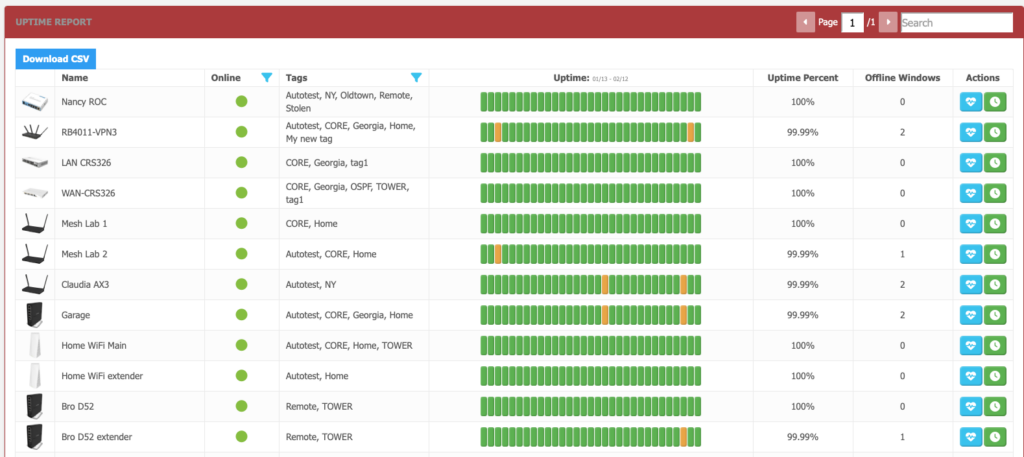
You’ll now find a dedicated Uptime Report under Reports > Uptime Report. This page gives you a clear picture of how each router in your fleet has performed over the last 30 days.
For every router, you’ll see a visual timeline showing exactly when the device was online versus offline, the overall uptime percentage for the month, and a download to csv option.
No more piecing together connectivity issues from scattered alerts. If a customer calls about intermittent problems, you can pull up their router and immediately see the pattern.
Problematic Routers
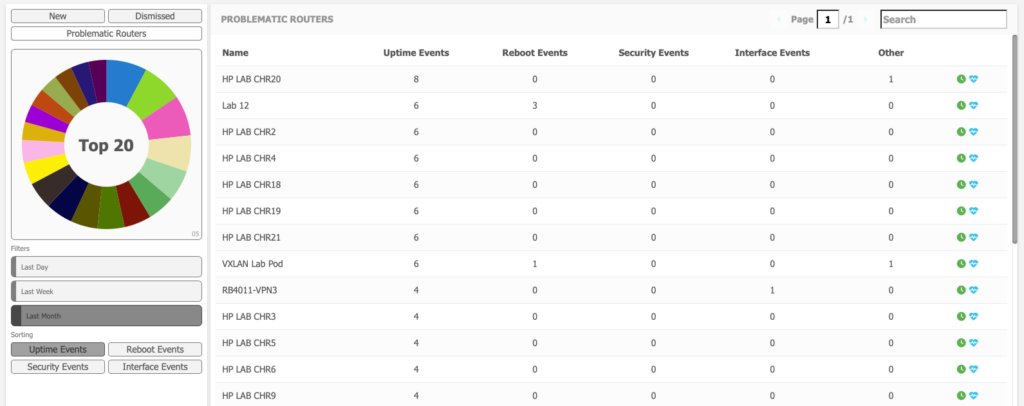
The Alerts page (Dashboard > Alerts) now includes a “Problematic Routers” tab that groups all active alerts by router rather than showing them chronologically.
This view surfaces which devices are generating the most noise in your deployment. Instead of scrolling through hundreds of individual alerts, you can instantly identify the handful of routers that need attention first—whether that’s a truck visit, a configuration change, or a conversation with the end user.
Both features are live now. Let us know what you think.

Related Posts