Recently we had the opportunity to investigate some polling and telemetry issues on some poorly…
What’s New in Compass WiFi: Enhanced Subscriber Views, Better Analytics, and UI Upgrades
Managing subscriber WiFi and delivering seamless home network visibility just got a major upgrade. We’ve just rolled out lots of updates to the Compass WiFi subscriber view dashboard on the Admiral Platform.
Designed to give both subscribers and network administrators clearer insights, streamlined device management, and faster performance, these updates refine the entire home network management experience.
🔍 Expanded Insights on the Main View
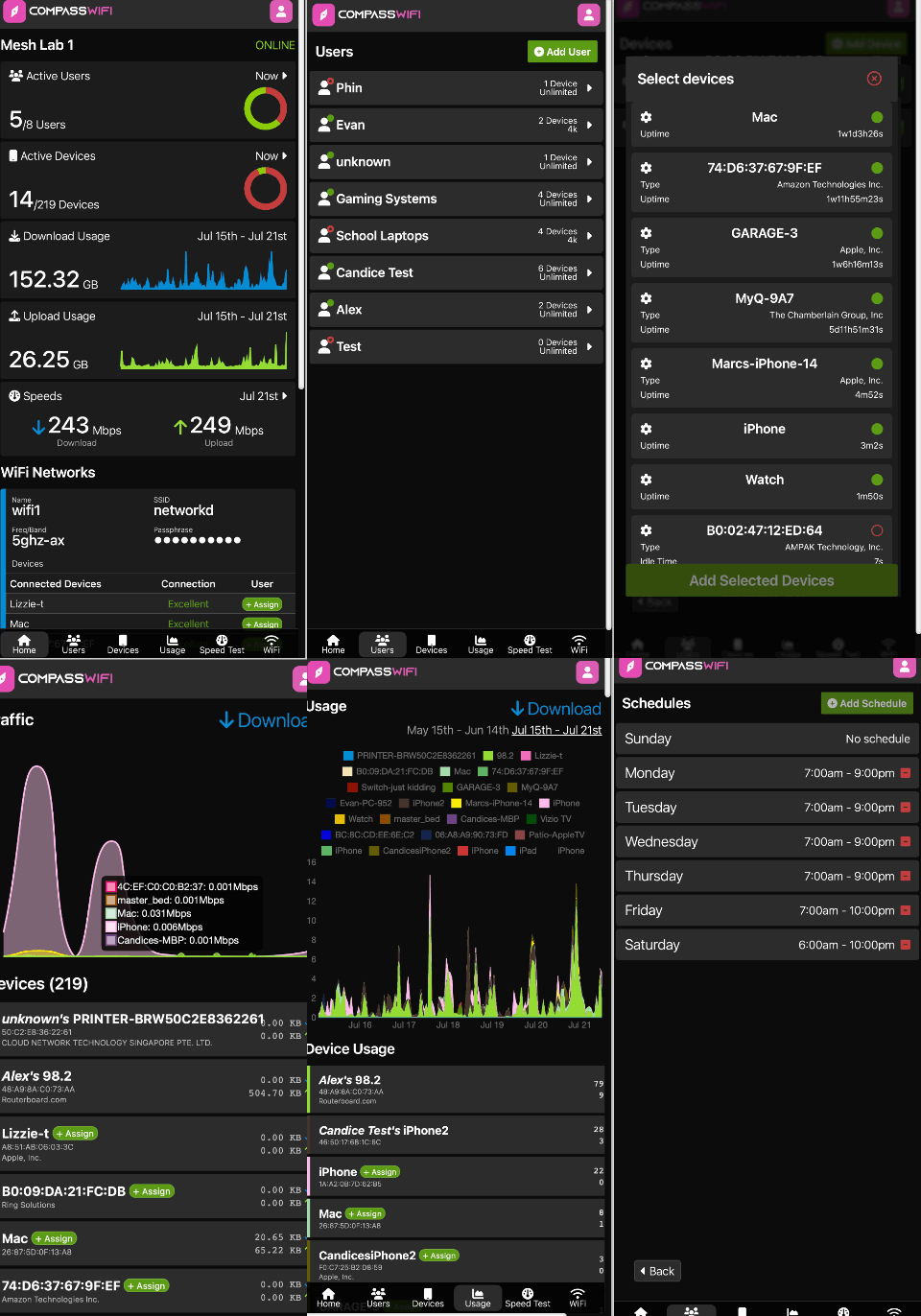
We’ve revamped the initial dashboard tab to display vital network health metrics at a single glance:
- Active Users & Devices: Real-time counters and status rings showing active vs. total network profiles and connected devices.
- Bandwidth Usage Trends: Historical download and upload usage charts covering weekly activity.
- Live Speed Test Summary: Instant insight into overall download and upload speed performance.
📶 WiFi Tab UI & Connected Devices Breakdown
Managing multiple wireless networks is now easier and more intuitive. The updated WiFi tab introduces an enhanced user interface along with direct device mapping:
- Per-Network Connected Devices: Instantly see which devices are connected to specific SSIDs
- Connection Health Indicators: Monitor real-time connection quality (e.g., Excellent, Good) per device.
- Quick User Assignment: Assign connected hardware to specific home profiles directly from the device listing.
📊 All-New Dedicated “Usage” Tab
To help users better understand home bandwidth consumption, we’ve added a standalone Usage section:
- All-Devices Usage Graph: High-level visual timeline tracking total internet activity across all connected hardware.
- Sorted Consumption Table: A granular, sortable breakdown of data consumption on a per-device level—making it simple to spot top bandwidth consumers.
🎨 Overhauled Design & Accessibility
We redesigned the Subscriber View to make navigation seamless on both desktop and mobile devices:
- Modern Navigation Bar: Clean, quick-access bottom navigation for Home, Users, Devices, Usage, Speed Test, and WiFi.
- Improved Contrast & Readability: Optimized dark mode aesthetics with higher color contrast, responsive typography, and improved screen-reader accessibility across the entire subscriber interface.
⚡ Optimized Loading Performance
Behind the scenes, we’ve overhauled the data-fetching and caching mechanisms:
- Faster Dashboard Initial Load: Metrics and usage graphs load significantly faster on launch.
- Seamless Tab Switching: Smooth transitions between tabs with minimized loading delays.
Experience the Updated Dashboard
The updated Compass WiFi view is now live across all supported deployments in the Admiral Platform! Log in to explore the new usage analytics and UI enhancements today.

Related Posts