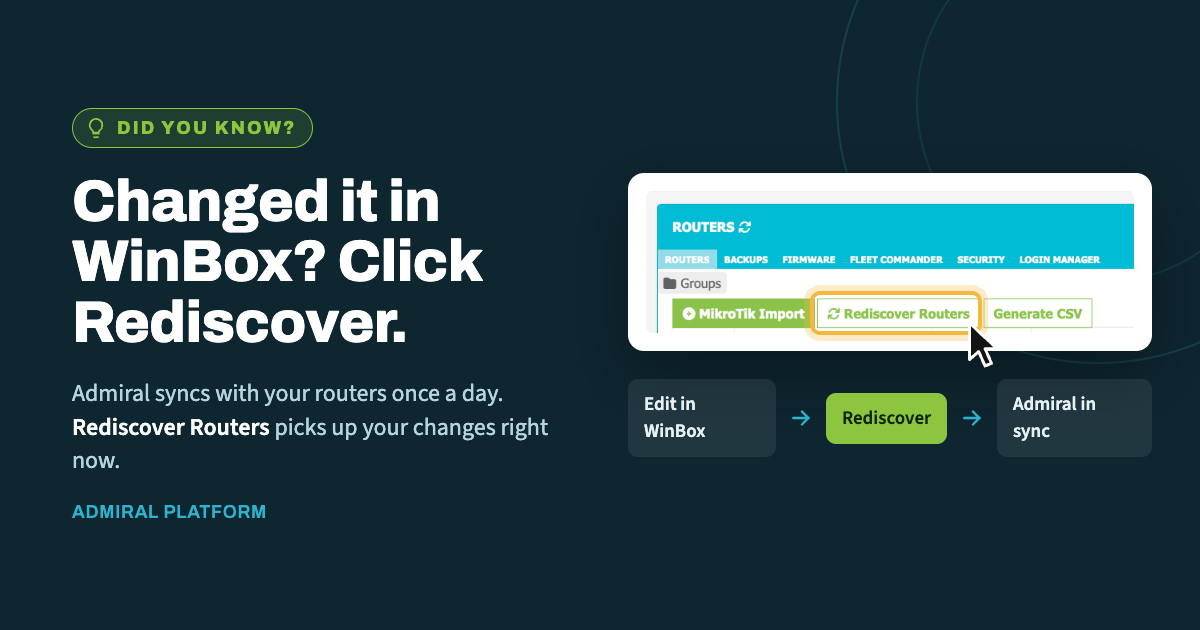
When you make a change directly on a router in WinBox, Admiral doesn't learn about…
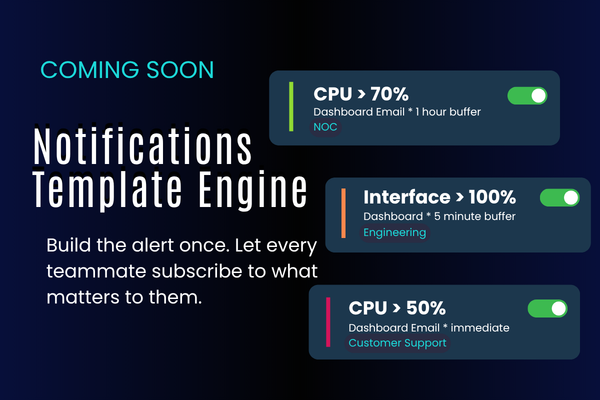
Coming Soon: The Notifications Template Engine
Alerting is one of those things that sounds simple until you actually run a network for other people. Every technician wants slightly different thresholds. The NOC wants to know the second an interface flaps; the customer support team would rather not hear about it at all. Somebody sets up an alert on a Friday, forgets to turn it off, and by Monday the inbox is a wall of CPU warnings nobody reads anymore.
Our dev team has been building something to fix that: a custom Notifications Template Engine for the Admiral Dashboard.
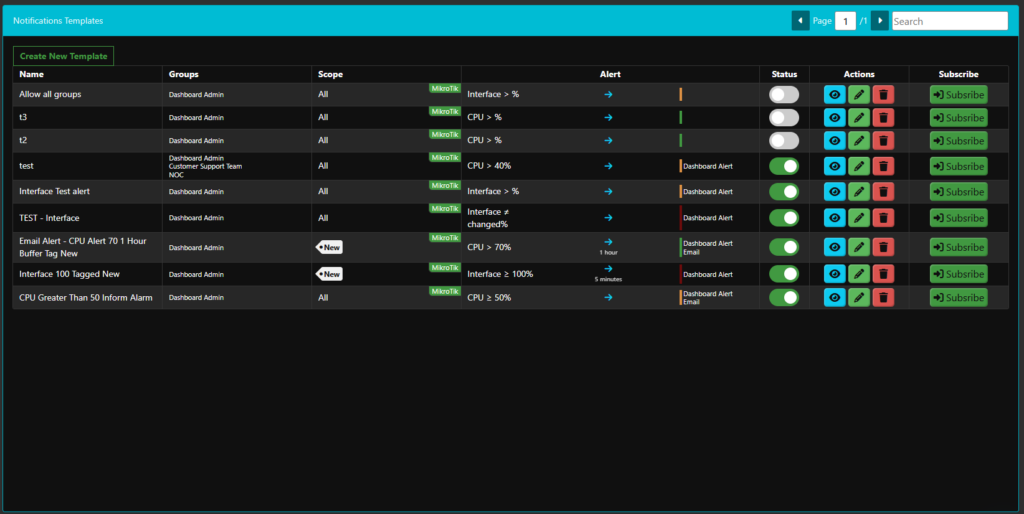
The core idea is that alert definitions become reusable objects instead of one-off settings. An administrator builds a template once, and any user in the system can subscribe to it. No re-creating the same threshold rule for the twelfth time, and no hunting through a dozen screens to figure out why someone is or isn’t getting alerted.
What goes into a template
When an admin creates a template, they’re describing four things: what to watch, when to fire, who hears about it, and what it says.
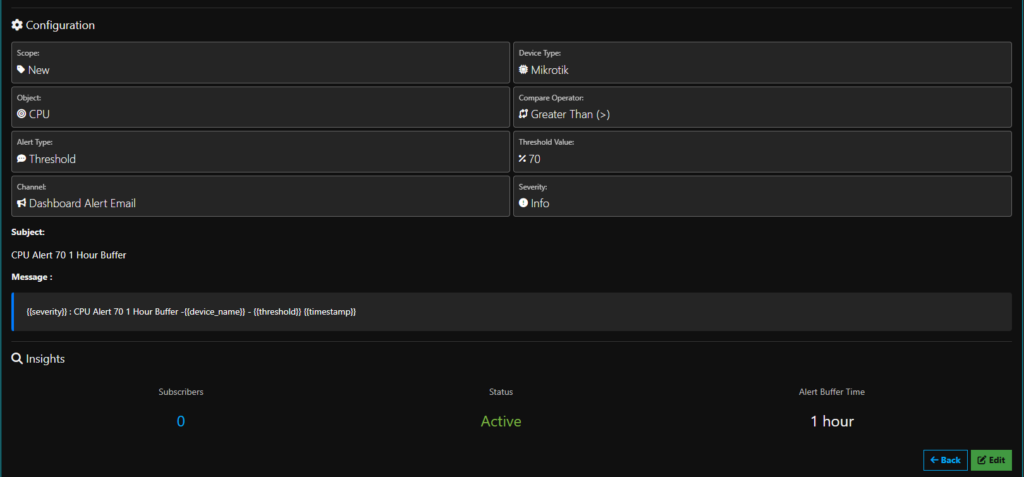
Scope and device type. A template can apply to every device in the dashboard, or it can be narrowed with a keyword tag — so a template scoped to New only touches devices carrying that tag. Device type is selected separately, so a MikroTik-specific rule stays on MikroTik gear.
Object and condition. Pick the object being monitored — CPU, interface state, and so on — then pair it with a compare operator and a threshold value. CPU > 70%. Interface ≥ 100%. Interface ≠ changed%. The operator is its own field rather than being baked into the alert type, which means the same object can drive very different rules depending on what you’re actually worried about.
Alert buffer time. This is the one that saves inboxes. A template can fire immediately, or it can hold and consolidate for a defined window — one hour, five minutes, whatever fits the metric. A CPU spike that resolves in ninety seconds probably doesn’t need to wake anyone up. A link that’s been down for an hour does.
Channel and severity. Alerts can route to the dashboard, to email, or to SMS — or to more than one at once. Severity (Info, and the levels above it) is set on the template, so the same condition can be informational for one audience and urgent for another.
Subject and message. Every template carries its own subject line and message body, with variable substitution for the details that change per event:
{{severity}} : CPU Alert 70 1 Hour Buffer – {{device_name}} – {{threshold}} {{timestamp}}
That means alerts arrive already reading like something a human wrote, instead of a generic system string that needs decoding.
Permissions, groups, and subscriptions
This is the part we think will matter most to MSPs.
Templates are tied to groups. An admin can build a template and assign it to Dashboard Admin, the NOC, the Customer Support Team, or any combination — or flip the Allow All Groups toggle and make it available system-wide. Engineering can have a set of deep, noisy, threshold-heavy templates while customer-facing staff see only the handful of alerts that are actually relevant to a customer conversation.
Subscription is opt-in from there. A template being visible to a group doesn’t mean everyone in that group is getting paged; each user subscribes to the templates they want. Admins define the alerting vocabulary, and users pick from it. The template list shows a live subscriber count, so it’s easy to see which templates are doing real work and which ones nobody ever picked up.
Every template also has an active/inactive toggle. A template that’s causing more noise than signal can be switched off in one click without deleting the work that went into it, and switched back on when the maintenance window ends.
Why we built it this way
We kept coming back to the same failure mode: alerting configuration that lives in individual users’ settings is invisible, unauditable, and impossible to standardize. When a technician leaves, their alerting knowledge leaves with them.
Making templates first-class objects — with an owner, a permission scope, a subscriber list, and a status — turns that tribal knowledge into something a team can actually manage. A new NOC hire subscribes to the standard set on day one. A customer with unusual thresholds gets a tagged scope instead of a pile of hand-built rules. And when alert volume gets out of hand, there’s one list to look at.
What’s next
The template engine is in active development now. We’ll follow up with a walkthrough of building a template end to end once it lands, and we’re already looking at where the engine goes after launch — more monitored objects, richer scoping, and additional channels.
If you’re running Admiral Platform and you have a specific alerting scenario you’d like this to handle, we’d like to hear it while the design is still flexible. That kind of feedback has a habit of ending up in the shipped product.

Related Posts